Our work / AI in finance
A system that reads invoices, shows exactly where each field came from on the page, and sends anything it is unsure about to a person. Matching payments to bank entries is the next step, now in prototype.
- Fields extracted
- 20
- Traced to the page
- 20 of 20
- Text confidence
- 0.98
- Flagged for review
- 5
| Field | Value | Conf. |
|---|---|---|
| Invoice number | 58126171 | 0.75 |
| Invoice date | 2015-08-14 | 1.00 |
| Currency | $ | Review 0.63 |
| Seller | Mclean Inc | 0.98 |
| Seller address | 245 Robert Viaduct Patriciaberg, TN 36261 | 0.77 |
| Seller tax ID | 913-81-7541 | 0.80 |
| Client | Richards and Sons | 0.98 |
| Client address | 094 McIntosh Estates Suite 179 East Sherry, TX 54155 | 0.83 |
| Client tax ID | 952-95-0332 | 0.80 |
| Item 1 | Multi Color Elephant Design White Dinning Table Top Marble Hall Table 36 Inches | Review 0.73 |
| Item 1 amount | 9631.87 | 0.89 |
| Item 2 | 6'x3' Elegant Marble Black Top Dining Table Italian Inlay Furniture Decor E964B | Review 0.72 |
| Item 2 amount | 6016.32 | 0.88 |
| Item 3 | 5'x2' Marble White Center Table Top With 18" Tall Stand Pauashell Inlay Art Deco | Review 0.72 |
| Item 3 amount | 12833.34 | 0.87 |
| Item 4 | Semi precious Stone Work Inlaid Dinning Table Top Marble Kitchen Table 42 Inches | Review 0.73 |
| Item 4 amount | 5491.20 | 0.86 |
| Subtotal | 30884.30 | 0.88 |
| Tax | 3088.43 | 0.88 |
| Total | 33972.73 | 0.91 |
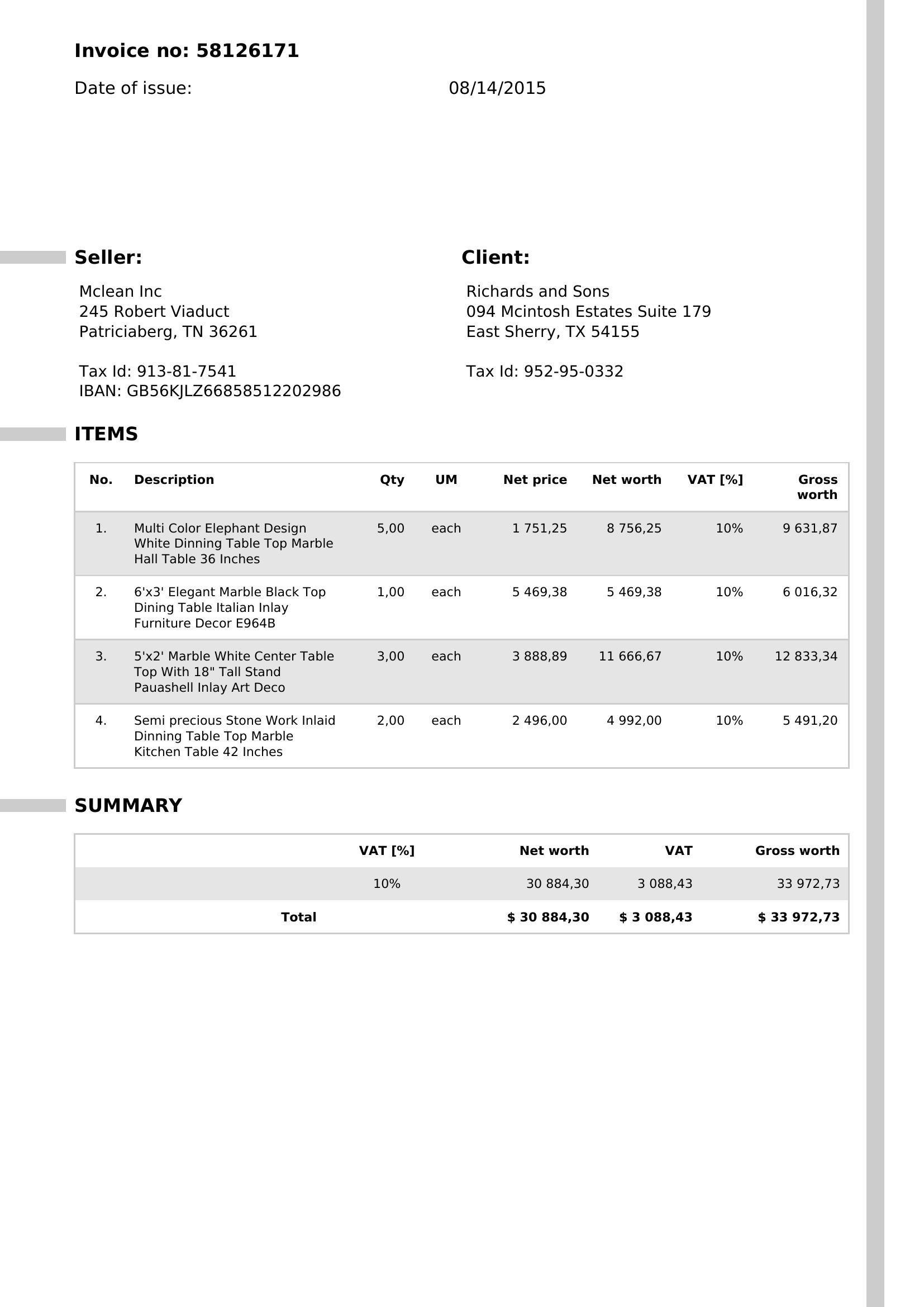
Fig. 1 A real invoice read by the system. Each block is outlined, and every field it extracted is outlined where it appears on the page, with a confidence score. Fields it is least sure of are flagged in red. Select a field or an outline to link the two.
- Input
- Invoices as PDFs, photos or scans
- What it does
- Reads every field and traces it to where it appears on the page
- Output
- A structured record per document, with a confidence score for each field
- Where it runs
- On your servers or a private cloud
The problem
For many Indian businesses, invoices and payment proofs arrive as PDFs, photos and screenshots. Someone in accounts opens each one, reads the amounts, dates and references, and types them into the books.
With a few hundred documents a month, this takes days of work. Mistakes stay hidden until month-end close, a customer dispute, or a question from the CA.
Why spreadsheets and templates fall short
Reading an invoice sounds simple. In practice, three things get in the way.
Documents come in every format.
Each supplier lays out an invoice differently, and proofs from different apps put the amount and reference in different places.
A wrong number is worse than a missing one.
A misread amount or tax ID flows into the books without anyone noticing. The system has to say how sure it is about each field.
A reviewer needs to see the source.
A value is only useful if the reviewer can see where on the page it came from, and confirm it at a glance.
How we built it
Read the document
A vision-language model reads each invoice and pulls out the parties, dates, line items, amounts and tax details.
Trace each field to the page
Every extracted value is tied to the exact spot where it appears, so a reviewer sees it outlined on the document.
Flag what it is unsure about
Each field carries a confidence score. Low-confidence fields go to a short review list for a person to check.
Hand over a clean record
The result is a structured record for each document, for the team to approve or correct before it reaches the books.
Under the hood
- A vision-language model reads invoices from any layout, without a template for each supplier
- Every field is tied to its position on the page
- A confidence score for each field
Choices we made on purpose
Every value points back to the page.
A number the reviewer cannot trace is a number they cannot trust, so each field is outlined where it appears.
A person reviews what the system is unsure about.
Routine fields pass through. Anything with low confidence goes to someone in accounts, with the source in view.
It fits the way accounts teams already work.
Documents keep arriving the way they do today, and the output is a clean record the team checks before the books change.
What works today, and what is next
Reading invoices and tracing each field to the page works today. Matching a payment to a bank entry and to the right invoices is in prototype.
On the real invoice above, the system:
- Read 20 of 20 fields, each outlined where it appears on the page
- Flagged the fields it was least sure of, so a person checks only those
Matching payments to bank entries and invoices is the next step.
- Vendor bills
- Purchase orders
- Expense receipts
Spending days typing in invoices?
Tell us what documents reach your accounts team today. One of the founders will reply within a working day.